Little Rabbit: A Font That Feels Like a Friendly Wave
You know that feeling when you’re designing a birthday invite, a classroom poster, or a t-shirt for your small business, and you just want something that feels… approachable? Not stiff, not overly formal, just genuinely warm and easy to look at. That’s exactly where Little Rabbit comes in. It’s a display font that doesn’t try to be edgy or complicated. Instead, it leans into simplicity and friendliness, making it a surprisingly versatile tool for a whole range of creative projects. Whether you’re a parent helping with a school project, a crafter selling handmade goods, or a small business owner looking for a softer touch in your branding, this typeface has a knack for making designs feel instantly more welcoming.
More Than Just “Cute”: The Visual Appeal of This Typeface
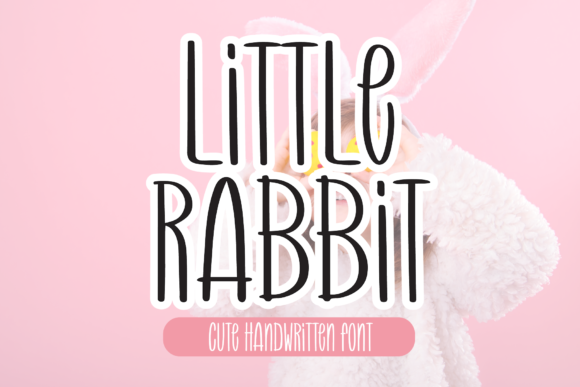
At first glance, Little Rabbit might remind you of a clean, slightly rounded handwritten style. The letterforms are open and legible, with a consistent baseline and gentle curves that avoid looking childish or amateurish. It strikes a balance—it feels personal and crafted, yet clear enough to be used at various sizes. This isn’t a font that screams for attention; it’s the kind that quietly supports your message. The uniform stroke width gives it a modern, tidy appearance, while the subtle imperfections (think slightly uneven edges or soft terminals) add that human touch. It’s this combination that makes it work for both playful and professional contexts. You could use it for a bakery’s logo and then again for a community event flyer without it feeling out of place.
Where Little Rabbit Truly Shines: Practical Applications
Think about the last time you saw a font that just “worked” across different mediums. Little Rabbit has that kind of flexibility. Its strength lies in its simplicity, which allows it to adapt without losing its core personality. Here’s a breakdown of where you might find it most useful:
- Branding & Logo Design: For brands targeting families, children, education, wellness, or local community services, this font can set a friendly and trustworthy tone. It’s excellent for wordmarks or pairing with a simple icon.
- Packaging & Merchandise: Imagine it on a kraft paper label for homemade jam, a tote bag design, or a sticker for a kids’ clothing line. Its clarity ensures product names are readable, even at a glance.
- Print Materials & Invitations: From wedding save-the-dates with a relaxed vibe to school fundraiser posters, it brings a handcrafted feel without sacrificing professionalism.
- Digital Spaces: It’s surprisingly effective for website headers, blog post titles, and social media graphics. On platforms like Instagram or Pinterest, where first impressions are visual, a friendly font can make your content more clickable and shareable.
- Editorial & Digital Products: Use it for chapter titles in an e-book, headings in a newsletter, or labels in a printable planner. It guides the reader’s eye gently.
Making It Work for Your Project: A Practical Guide
Choosing a font is one thing; using it effectively is another. Here’s how to integrate Little Rabbit into your workflow for maximum impact.
Pairing for Balance and Hierarchy
Because Little Rabbit is a display font, it’s designed for headlines and short bursts of text, not long paragraphs. The key to using it successfully is pairing it with a highly readable body font. A clean sans serif font like Montserrat or Open Sans creates a modern, crisp contrast. For a more traditional or editorial look, a classic serif font like Lora or Merriweather provides elegant stability. The goal is to let Little Rabbit handle the personality while its partner handles the information.
Testing for Readability and Context
Always test your chosen font in the context it will be used. Type out your actual headline or logo text. Zoom out to see if it remains legible at small sizes, like on a mobile screen or a product tag. Check the spacing (kerning) between specific letter pairs—sometimes a ‘W’ and an ‘a’ might need manual adjustment. Print a test page if you’re creating physical materials. Does it hold up on textured paper? This hands-on testing separates a good design from a great one.
Understanding the Full Package
When you acquire a premium font like Little Rabbit, you’re often getting more than a single file. Check what’s included. Are there multiple weights (like regular and bold)? Does it come with alternate characters or stylistic sets that can add variety? Understanding these extras allows you to create more dynamic and nuanced designs within the same typeface family, ensuring visual consistency across all your brand identity materials.
The Business Side: Licensing and Professional Use
This is a crucial step many creators overlook. If you’re using Little Rabbit for a client project, for merchandise you sell, or in any commercial capacity, you need to ensure you have the correct commercial font license. Most reputable font foundries offer clear licensing tiers—often for desktop, web, and app use. Using a font without the proper license can lead to legal issues down the line. Always purchase from the official source and read the license agreement. It’s a small step that protects your business and supports the type designers who create these valuable design assets.
A Final Thought on Choosing Your Tools
Finding the right typeface is a bit like finding a good collaborator. It should support your vision, not overshadow it. Little Rabbit doesn’t demand to be the star of the show; it asks to be part of the team. Its friendly demeanor makes it a solid choice for projects where approachability and clarity are key. So, the next time you’re starting a design and feel the need for something that’s both simple and full of character, consider giving this creative font a try. You might be surprised at how much warmth and professionalism a single typeface can bring to your work.