Peony: The Bold Display Font That Commands Attention
There’s a moment in every creative project where you realize the typography isn’t just holding the words—it’s setting the entire mood. You’ve found the perfect image, nailed the layout, and written compelling copy, but something feels off. Often, that missing piece is a typeface with enough personality to tie everything together without overwhelming the design. Enter Peony, a bold, all-caps display font that blends contemporary trendiness with striking visual presence, offering designers and creators a powerful tool for projects that need to make an immediate impact.
Understanding the Visual Character of Peony
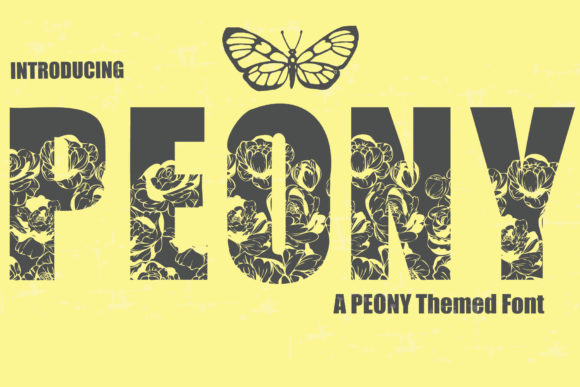
Peony isn’t just another bold font. Its design philosophy centers on confident, unapologetic letterforms that demand to be seen. The all-caps structure gives it a uniform, structured feel, while the carefully crafted curves and terminals prevent it from feeling rigid or mechanical. This balance is what makes it so versatile. It feels modern and fresh, yet substantial enough to convey authority. Think of it as the typographic equivalent of a well-tailored blazer—sharp, professional, and instantly elevating.
The font’s visual appeal lies in its details. The weight distribution across each letter ensures excellent legibility even at smaller sizes, a critical factor for applications like packaging or social media graphics where text might be viewed on mobile devices. The spacing between letters is optimized for readability in headlines and short blocks of text, preventing that cramped, hard-to-read look some display fonts suffer from. This thoughtful design means you spend less time tweaking kerning and more time focusing on the overall composition.
Practical Applications Across Creative Projects
Where does a font like Peony truly shine? Its bold, expressive nature makes it ideal for projects where typography is a central design element, not just a functional necessity.
- Branding and Logo Design: A logo needs to be memorable and scalable. Peony’s strong silhouette works beautifully for logotypes, especially for brands in fashion, lifestyle, beauty, or artisanal food spaces that want to project confidence and style. It can stand alone or be paired with a simpler sans-serif or script font for a complete brand identity system.
- Packaging and Merchandise: On a shelf or in an online store, you have seconds to grab attention. Using Peony for product names or key descriptors on packaging—whether it’s a coffee bag, a candle label, or a cosmetic box—instantly creates a premium, curated feel. The same applies to merchandise like tote bags, t-shirts, or mugs where the typography itself is part of the product’s appeal.
- Digital and Social Media: In the fast-scrolling world of social media, your graphics need to stop thumbs. Peony is perfect for creating impactful Instagram story headers, YouTube thumbnails, Pinterest pins, or Facebook ad headlines. Its boldness ensures your message cuts through the visual noise. For bloggers and content creators, it can be used for post titles or featured graphics to establish a consistent and recognizable visual style.
- Editorial and Print Design: Think beyond digital. Peony excels in print materials like magazine covers, poster layouts, event flyers, and invitation suites. For a wedding invitation, it could spell out the couple’s names with elegance and strength. For a music festival poster, it conveys energy and excitement. In editorial layouts, it can be used for pull quotes or section headers to add visual interest and break up long-form text.
Enhancing Your Design Strategy with Intentional Typography
Choosing a font like Peony is more than an aesthetic decision; it’s a strategic one that can directly influence your project’s effectiveness.
Improving Brand Recognition: Consistent use of a distinctive typeface across all touchpoints—from your website to your invoices to your social media—builds visual equity. When your audience sees that familiar Peony headline, they immediately associate it with your brand’s voice and values. This consistency fosters trust and professionalism.
Guiding Audience Engagement: Typography directs the reader’s eye. A bold, all-caps font naturally creates a strong hierarchy. You can use Peony for the most important message—the headline, the call-to-action, the key benefit—and pair it with a more neutral body font. This contrast guides the viewer through your content exactly as you intend, improving comprehension and engagement.
Balancing Trendiness with Timelessness: While Peony has a trendy edge, its clean construction gives it staying power. The goal isn’t to chase every fleeting design fad, but to select assets that feel current yet have enough substance to last. Peony strikes that balance, making it a smart investment for projects that need to feel relevant now and for the foreseeable future.
Practical Tips for Working with a Display Font
Integrating a bold display font like Peony into your workflow requires some thoughtful consideration to maximize its impact.
Master the Art of Font Pairing: A powerful display font rarely works well in isolation for all text. The key is pairing. Let Peony handle the headlines, subheads, and call-outs. Then, complement it with a highly readable serif font for body copy (for a classic, authoritative feel) or a clean sans-serif font (for a more modern, minimalist look). Avoid pairing it with another strong personality font like a script font or handwritten font in close proximity, as they will compete for attention.
Prioritize Readability in Context: Always test your chosen font in its intended environment. View your website mockup on a phone screen. Print out a proof of your poster design. Check that the letter spacing in Peony remains legible at the sizes you’ll be using. A font that looks stunning in a design software preview might lose clarity when applied to a textured background or viewed from a distance.
Understand Your Licensing: If you’re using Peony for commercial projects—a client’s logo, products for sale, or paid marketing materials—ensure you have the correct commercial font license. Most premium fonts offer different license tiers. Review the terms carefully to understand what’s permitted, whether it’s for desktop use, web embedding, or app integration. This is a non-negotiable step for professional work.
Explore the Full Character Set: Before you start, take a moment to explore all the glyphs, numbers, and symbols included with the font. You might find alternates, ligatures, or special characters that can add a unique touch to your design, especially in logos or monograms. This exploration is part of leveraging your design assets to their full potential.
Ultimately, the right typeface acts as a silent partner in your creative vision. Peony offers a distinct voice—confident, stylish, and versatile. By understanding its strengths and applying it with intention, you can transform good designs into compelling visual stories that resonate with your audience and elevate your professional output. Whether you’re crafting a brand identity from scratch or refreshing your latest marketing campaign, consider how a font with this much character can serve as the cornerstone of your visual communication.