Giraffe Font: A Playful Display Typeface for Creative Projects
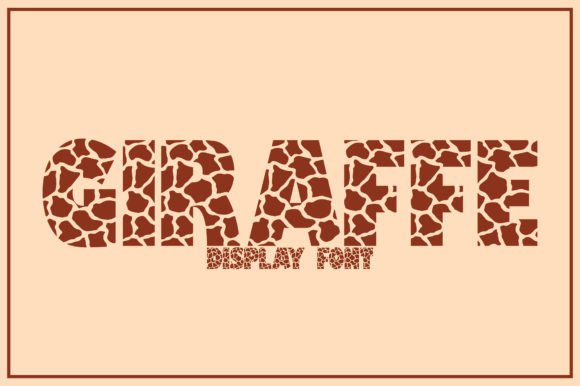
There’s something instantly likable about a font that doesn’t take itself too seriously. Giraffe is exactly that kind of typeface—a fun, cute display font that brings personality and warmth to any design it touches. Whether you’re working on a logo for a children’s brand, crafting social media posts for a bakery, or designing invitations for a summer party, this font has a way of making your work feel approachable and memorable without trying too hard.
What Makes Giraffe Stand Out Visually
Giraffe draws its charm from rounded letterforms, gentle curves, and a slightly whimsical weight that feels friendly without being childish. The characters have a softness to them that works beautifully in larger sizes, which is exactly where display fonts shine. Unlike rigid sans serif fonts or overly formal serif typefaces, Giraffe sits in a sweet spot—it’s modern enough for digital projects but warm enough for printed materials that need a human touch.
The spacing between letters feels balanced, and the overall rhythm of the typeface keeps text legible even when used for headlines or short phrases. You won’t find sharp edges or aggressive angles here. Instead, every stroke feels intentional and inviting, which makes it a solid choice when you want your audience to feel comfortable and engaged from the first glance.
Where This Creative Font Really Works
One of the best things about Giraffe is its versatility across different types of projects. It’s not a one-trick pony. Here are some practical ways designers, small business owners, and creators are putting display fonts like this one to work:
- Branding and Logo Design: If you’re building a brand identity for something playful—think kids’ clothing lines, pet shops, ice cream parlors, or creative agencies—Giraffe gives your logo a distinctive voice. It pairs well with simpler sans serif fonts for body text, creating a visual hierarchy that feels balanced.
- Packaging Design: Product packaging needs to grab attention on a crowded shelf. A font with personality like Giraffe helps your product stand out, especially for food items, cosmetics, stationery, or handmade goods where a friendly aesthetic matters.
- Social Media Graphics: Instagram stories, Pinterest pins, and Facebook posts all benefit from bold, readable typography. Giraffe works well for quote graphics, promotional announcements, and story highlights where you need text that pops without overwhelming the visual layout.
- Websites and Blogs: While it’s not ideal for long paragraphs of body copy, Giraffe is excellent for website headers, blog post titles, and call-to-action buttons. It draws the eye and sets the tone before visitors even start reading.
- Print Materials: Posters, flyers, brochures, and business cards all benefit from a display font that communicates energy and approachability. If you’re promoting an event, workshop, or sale, this typeface helps your materials feel inviting.
- Invitations and Greeting Cards: Birthday parties, baby showers, wedding save-the-dates with a casual vibe—Giraffe fits right in. Its playful character adds a personal touch that formal script fonts sometimes miss.
- Merchandise: Tote bags, mugs, t-shirts, and stickers often rely on bold typography to make a statement. A fun display font like Giraffe works well for merchandise that targets a younger or creative audience.
- Digital Products: If you sell planners, worksheets, e-books, or online course materials, using a distinctive font for headers and section titles helps your digital products feel polished and professional.
- Editorial Layouts: Magazine covers, newsletter headers, and zine layouts often need typography that breaks away from the ordinary. Giraffe adds visual interest without sacrificing readability at display sizes.
Matching Typography to Your Project Goals
Choosing the right font isn’t just about what looks pretty. It’s about alignment between your visual communication and the message you’re trying to send. A premium font like Giraffe works best when your project calls for warmth, creativity, and a sense of fun. If you’re designing for a law firm or a financial institution, this probably isn’t your go-to. But for a yoga studio, a children’s bookstore, a craft brewery, or a lifestyle blog? It’s a strong contender.
Think about your audience first. Who are you speaking to, and what kind of emotional response do you want to create? Fonts carry psychological weight. Rounded, softer typefaces tend to feel more approachable and trustworthy, while sharp, geometric fonts can feel more authoritative or cutting-edge. Giraffe leans into that approachable territory, which makes it ideal for brands and projects that want to feel relatable.
Font Pairing Tips That Actually Work
A display font rarely works in isolation. You’ll almost always need a secondary typeface for body text, captions, or supporting information. Here are some practical pairing strategies:
- Pair Giraffe with a clean sans serif like Open Sans, Lato, or Montserrat for body copy. The contrast between playful headers and straightforward body text creates a professional yet friendly hierarchy.
- Try it alongside a simple serif font if your project leans slightly more editorial. Something like Lora or Merriweather can ground the whimsy of Giraffe with a touch of classic structure.
- Avoid pairing it with other decorative or handwritten fonts. Too much personality in your typography creates visual noise and makes your design feel chaotic rather than intentional.
- Test your pairings at actual sizes. A font that looks great at 72 pixels on your screen might feel completely different at 14 pixels in a mobile layout. Always preview how your type choices work together in context.
Readability Considerations for Real-World Use
Every creative font comes with trade-offs. Giraffe is designed for display use, which means it works best at larger sizes—think headlines, titles, logos, and short phrases. Using it for long blocks of small text would likely hurt readability, and that’s not a flaw. It’s simply how display fonts are designed to function.
When you’re working on a project, consider the viewing context. Will people see this on a phone screen? A printed poster across a room? A product label held in someone’s hand? Adjust your font size, line height, and contrast accordingly. Good typography isn’t just about font choice—it’s about how that font performs in the environment where your audience will actually encounter it.
Understanding Licensing and Usage Rights
Before you add any commercial font to your project, take a moment to review the licensing terms. Most premium fonts come with specific usage rights that cover things like the number of users, whether you can embed the font in digital products, and if commercial use is included. If you’re designing for clients, selling merchandise, or distributing digital products, make sure your license covers those applications. It’s a small step that protects both you and the font creator, and it’s worth getting right from the start.
Bringing It All Together
Giraffe is the kind of font that earns its place in your design toolkit not because it’s flashy, but because it’s genuinely useful. It fills a specific role—bringing warmth, personality, and visual interest to projects that need a friendly, modern typeface. Whether you’re a designer building out a brand identity, a small business owner creating packaging for your products, or a content creator looking for typography that makes your social graphics stand out, it’s worth exploring how this display font fits into your workflow.
The best typography choices are the ones that serve your message and connect with your audience. Giraffe does both, and it does it with a kind of effortless charm that’s hard to fake. Give it a try in your next project and see how the right typeface can shift the entire feel of your design.